I help organizations improve performance through consulting, coaching, and training, powered by experiential learning and deep expertise in ITSM, DevOps, Generative AI, and PMO.
Human-AI Collaboration
Mastering Project Management
60 Minutes • 30m Presentation • 30m Workshop
Using AI effectively in project & delivery
leadership:
Clarity, trust, and better decisions
Clarity, trust, and better decisions
Platform Registration
for hands-on exercices
For participants, if you have not yet registered to the platform (hands-on exercise),
get the registration details here:
https://outsized-ai-for-project-manager.pages.dev/files/
Link in the chat.

Gonzague Patinier
Gonzague Patinier
I wished Gen AI was there, when ...
Technical Consultant
& Solution Architect
Consultant / Trainer
Communication Frameworks
Consulting Manager
Resource & Team Lead
ITSM / PMO Expert
Workflow Optimization
Who is here today?
Strategic Leadership & Human Capital
- Core: 25+ years in Organizational Development, Talent Management, and Business Strategy (Petro-chem, Banking, Telecom).
- Focus: Aligning people operations with high-impact corporate goals.
Digital Transformation & Product Innovation
- Core: SaaS modernization, AI integration, and UX Data Intelligence (Dell, Cisco, Target).
- Focus: Scaling global product suites and driving multi-million dollar ROI through tech.
Complex Program & Operations Management
- Core: Big 4 veterans and Business Analysts specialized in international project delivery (World Bank, USAID) and vendor optimization.
- Focus: High-stakes operations, procurement, and risk-mitigated growth.
Data-Driven Financial Strategy
- Core: Integration of Data Science and Financial Planning (CFP) within the Insurance and Finance sectors.
- Focus: Predictive modeling and data-led business analysis.
Key Regions: South Africa, India, Southeast Asia.
Expertise: 15–25+ Years per Profile.
Survey Results
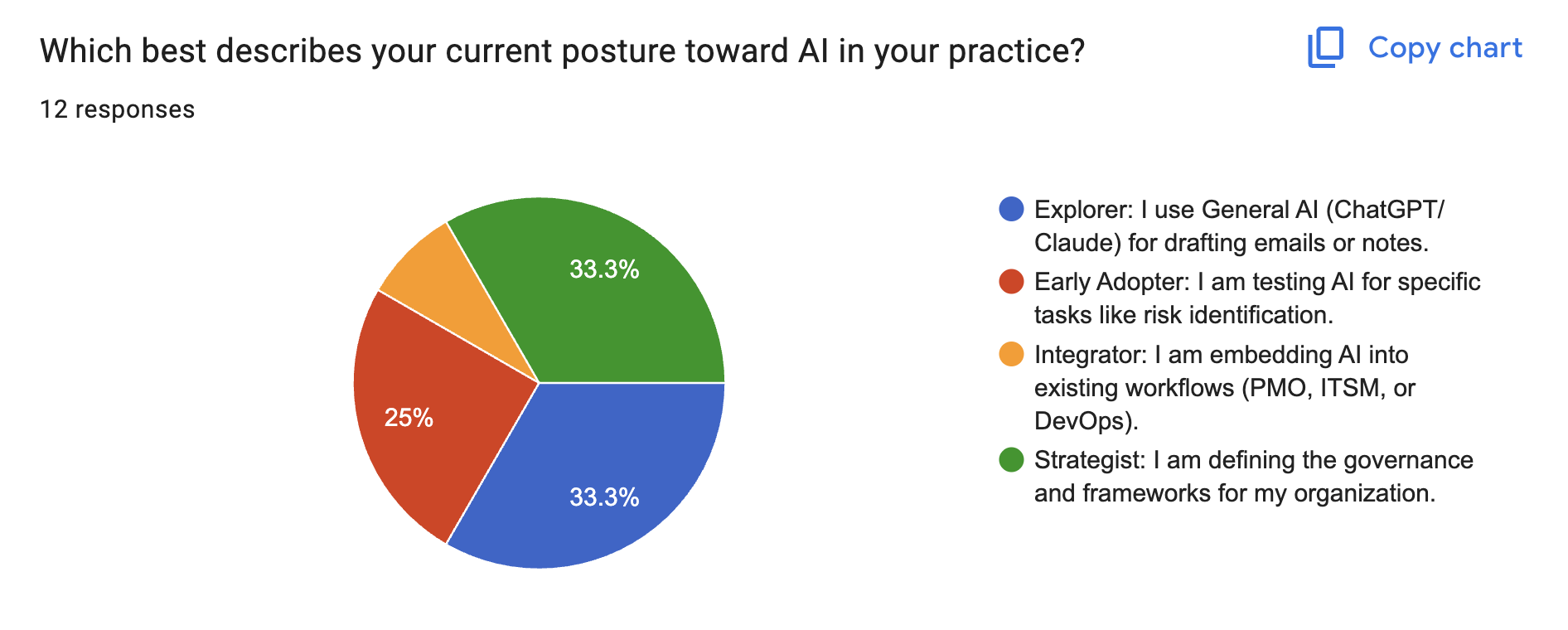
Survey Results
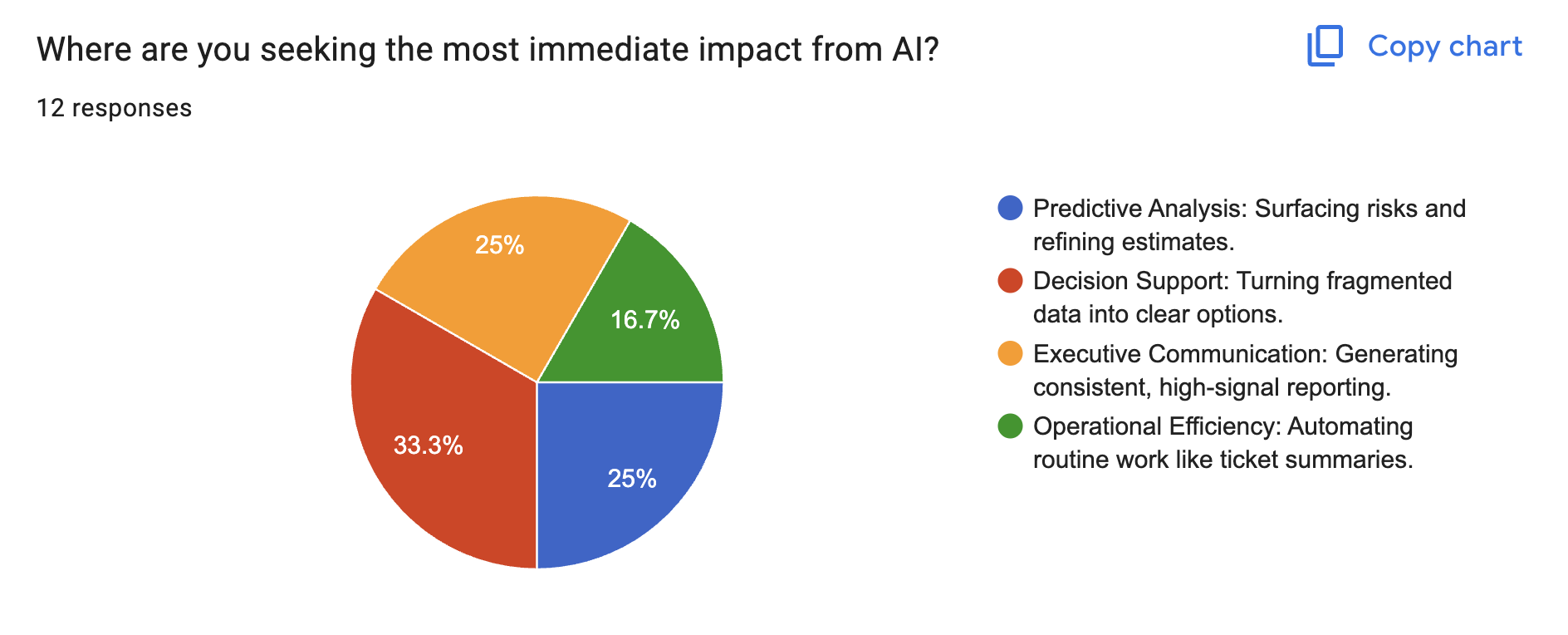
Survey Results
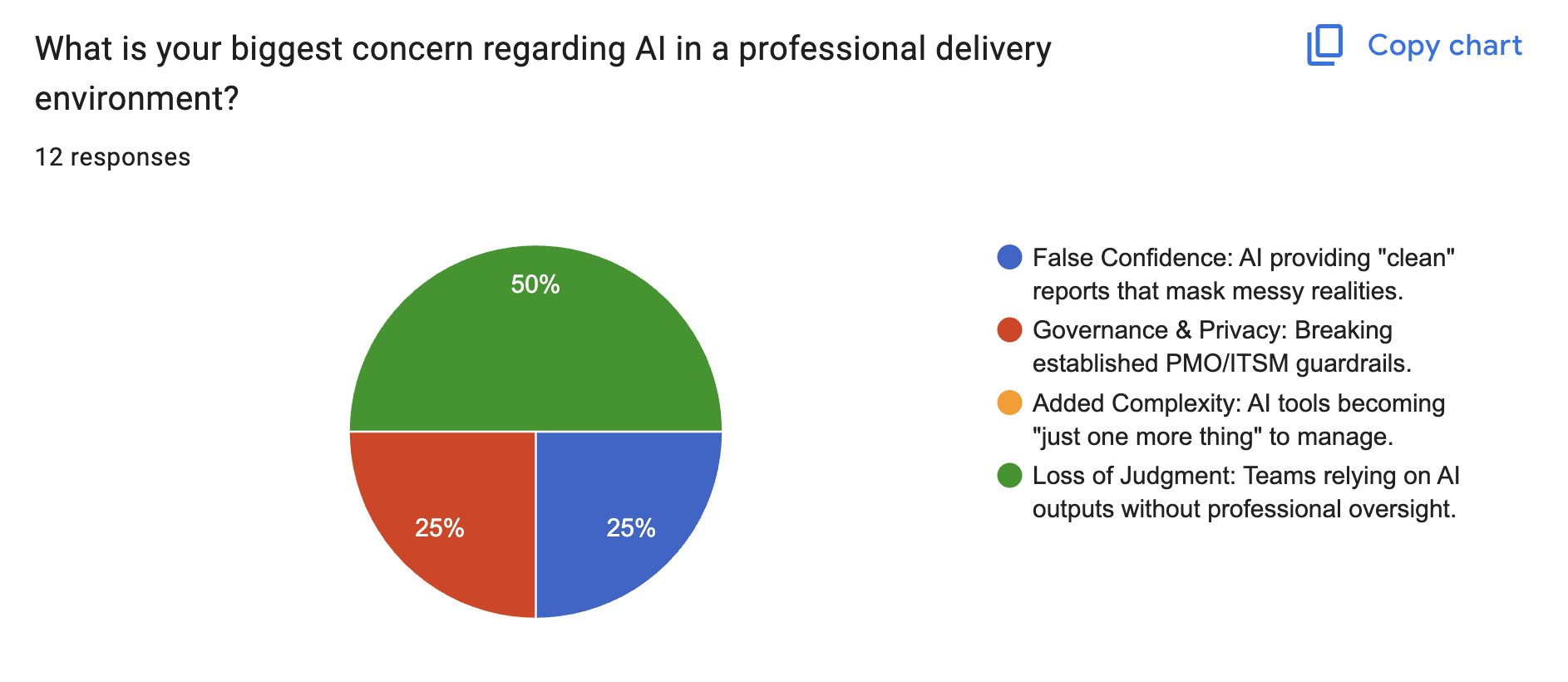
Session Objective
Empower PMs with
AI-driven techniques
to enhance execution, decision-making, and collaboration
while maintaining privacy-conscious workflows.
to enhance execution, decision-making, and collaboration
while maintaining privacy-conscious workflows.
The Roadmap
Part 1: Strategy
- LLM Ecosystem
- Tool Landscape
- Governance & Privacy
Part 2: Workshop
- Hands-on Live Session
- 20-Prompt Library
- Real-world Scenarios
What are LLMs?
Large Language Models are systems trained on massive datasets to understand context and generate human-like text.
Summarization
Condensing lengthy documents, meeting notes, and emails.
Drafting & Writing
Generating reports, communications, and project plans.
Risk Prediction
Analyzing historical data to flag potential project risks.
Code Generation
Automating scripts, formulas, and technical tasks.
Prompt Engineering 101
The RTF Framework
🎭
ROLE
Act as...
Set the
persona & context
⚡
TASK
Do what...
Define the
specific action
📝
FORMAT
Show as...
Specify the
output style
EXAMPLE:
"Act as a Senior PM (Role). Draft a risk mitigation plan for a delayed migration (Task). Present it as a Markdown table (Format)."
Advanced Prompt Techniques
Variables
Use placeholders like [PROJECT_NAME] to make prompts reusable.
Chain of Thought
Ask AI to explain its reasoning step by step.
Chain of Prompts
Break complex tasks into multiple prompt steps.
The Ecosystem
Key players in the AI space.
ChatGPT (OpenAI)
The versatile pioneer.
Claude (Anthropic)
Focused on safety and large context.
Gemini (Google)
Deep integration with workspace tools.
Mistral
High efficiency for specific tasks.
Deepseek
Cost-effective reasoning and coding.
Kimi
Long context window specialist.
The Main Pitfalls
Hallucinations
Confidently presenting false or made-up information as fact.
Bias
Reflecting stereotypes and skewing results based on training data.
Memory Loss
Limited context window leads to forgetting earlier details in long chats.
No Real Understanding
Predicting the next word based on patterns, not logic or reasoning.
Top AI-Enabled PM Tools
Trello AI
Smart automation and content generation for boards.
NotebookLM
Instant insights from your project documents.
Canva
Rapid visual creation for presentations and assets.
Notetaker AI
Automated meeting transcription and summaries.
AI Automation
Power Automate
Microsoft workflow automation.
N8N
Open-source workflow automation.
Sim
Automation and integration tool.
OpenClaw
AI automation framework.
Claude CoWork
AI collaboration workspace.
OpenCode
AI-powered coding assistant.
Uses Cases:
Game-Changing Features
Predictive Analytics
Forecasting delays before they happen.
Automated Synthesis
Turning messy notes into clean action items.
Intelligent Search
Q&A across your entire project documentation.
Dynamic Workflows
Auto-assigning tasks based on team load.
The Golden Principle
AI is your
Augmentation Tool, not your replacement.
Humans remain the final arbiters of
strategy, judgment, and accountability.
Humans remain the final arbiters of
strategy, judgment, and accountability.
Human in the loop:
Example - Risk Registry
Stage 1: Team Builds the Registry
Identify and document risks with basic details (description, likelihood, impact, mitigation).
Assign ownership and save in a shared tool/document.
Stage 2: AI Reviews and Suggests
AI analyzes the registry and provides feedback.
Suggests additional risks, updates scores, and improves mitigation plans.
Stage 3: PM Approves and Prioritizes
PM reviews and validates the registry.
Prioritizes risks based on likelihood, impact, and AI/team insights. Finalizes and shares with stakeholders for monitoring.
"Efficiency boost: 80%. Strategic accuracy: 100%."
Governance & Privacy
No PII
Never input Personally Identifiable Information.
Protect Secrets
Avoid proprietary code or financial secrets in public LLMs.
Use Placeholders
Use anonymized placeholders like [CLIENT_A] or [PROJECT_X].
Privacy-First Prompting
Redaction
"I am providing a transcript. **REDACT** all individual names and company specifics, then summarize the key technical bottlenecks."
Anonymization
Replace sensitive data with placeholders like [CLIENT_A], [PROJECT_X], or [COMPANY_NAME] before sharing with AI.
Context Stripping
Remove identifying context while preserving the core technical problem. Focus on patterns, not particulars.
The Project Lifecycle
🚀
1. INITIATION
➔
📋
2. PLANNING
➔
⚙️
3. EXECUTION
➔
🏁
4. CLOSING
Lifecycle PH 1: Initiation
Primary AI Uses
- Drafting Project Charters.
- Stakeholder Identification & Mapping.
- Initial Scope Exploration.
- Success Criteria Definition.
Lifecycle PH 2: Planning
Primary AI Uses
- WBS Structure Generation.
- Risk Matrix & Mitigation strategies.
- Schedule & Resource optimization.
- Communication Plan drafting.
Lifecycle PH 3: Execution
Primary AI Uses
- Status Report automation.
- Triage of incoming issues.
- Meeting note summarization.
- Action item extraction.
Lifecycle PH 4: Closing
Primary AI Uses
- Lessons Learned synthesis.
- Post-Mortem drafting.
- Handoff documentation.
- ROI & Benefit analysis.
Workshop Section
Practical Prompting
20 Hand-Picked Prompts for PM Excellence
System in Motion - AI Workshops
Format
- Onsite
- Online
Audience
- Public
- Semi-Public (2-3 companies)
- Private
Format
- Lecture
- Hands-on
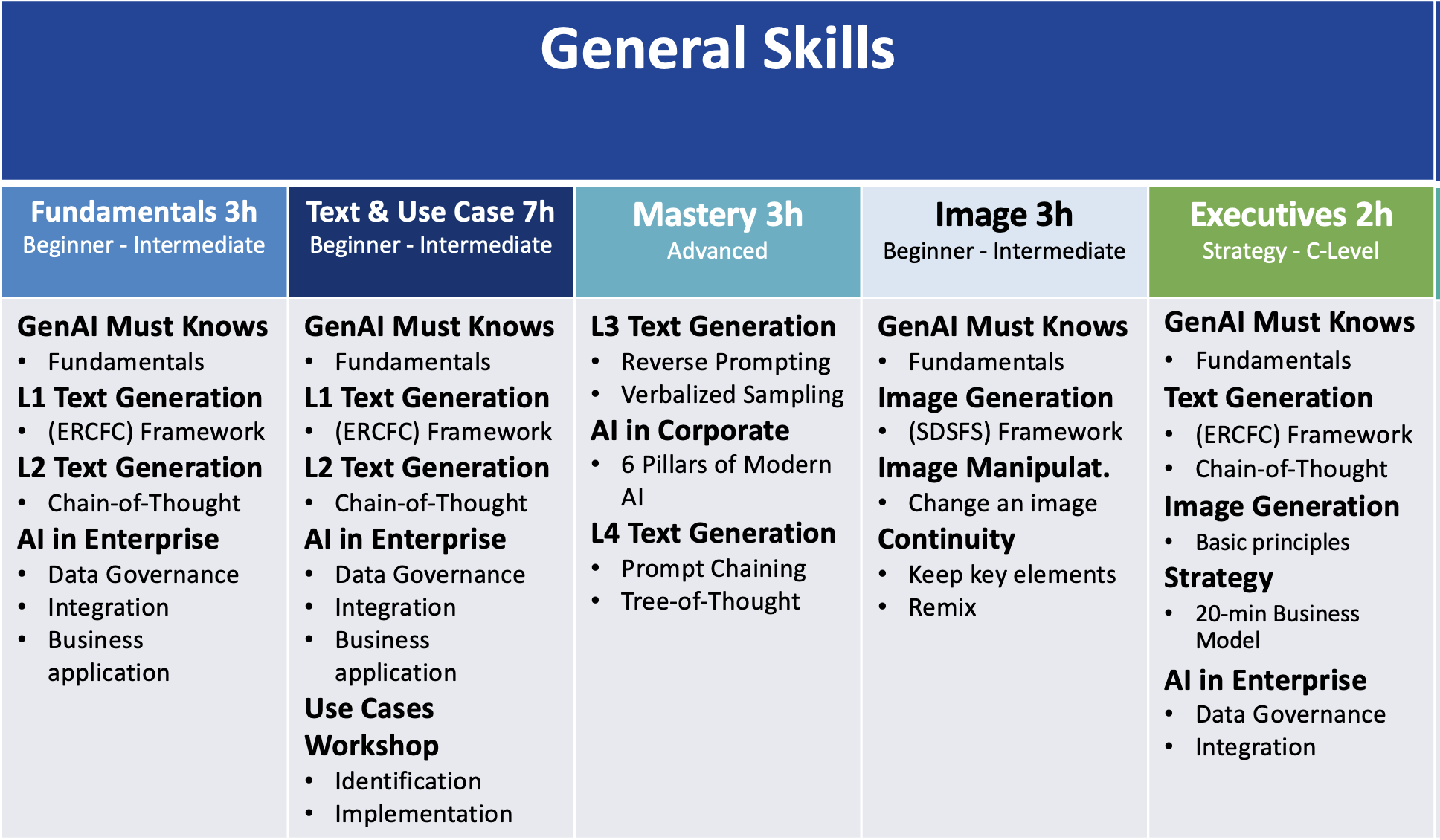
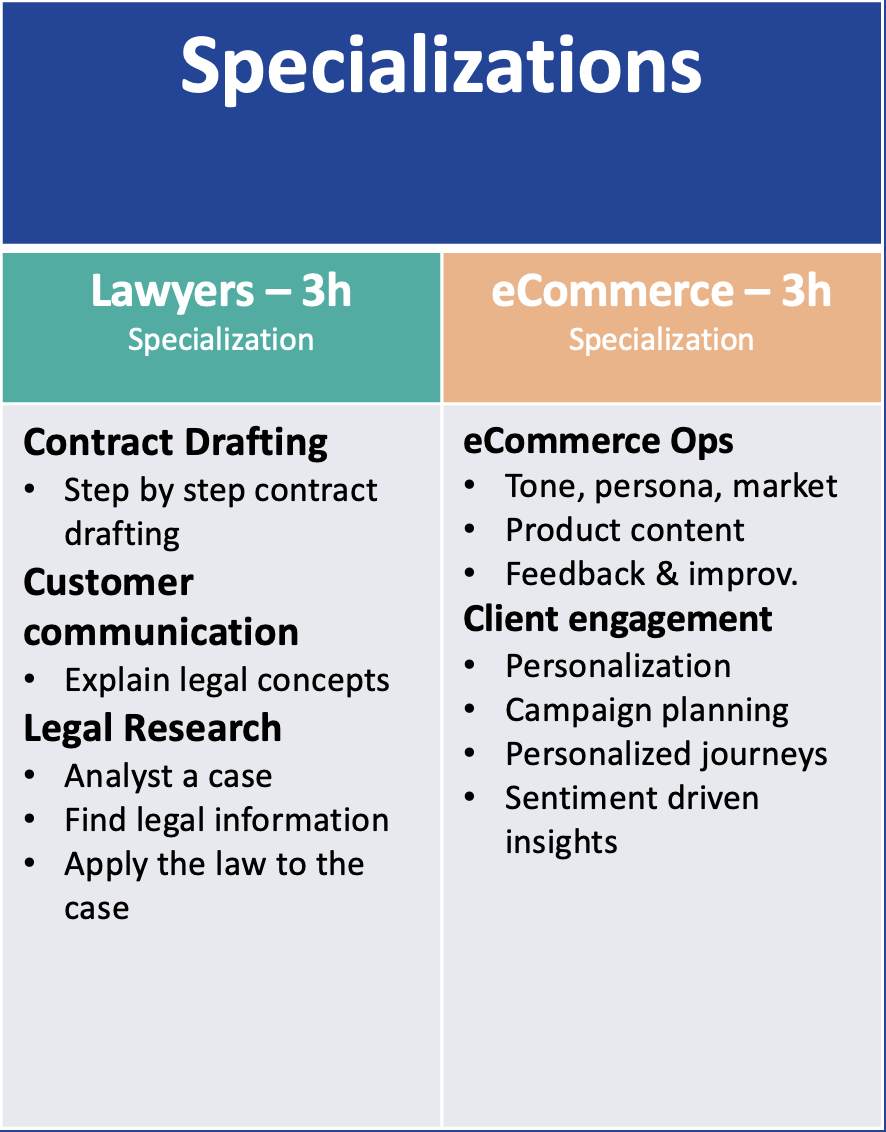
System in Motion - Specialisation
Content
- Updated every month
New in 2026
- Hospitality business
Other services
- Platform provider
- AI Champion Program
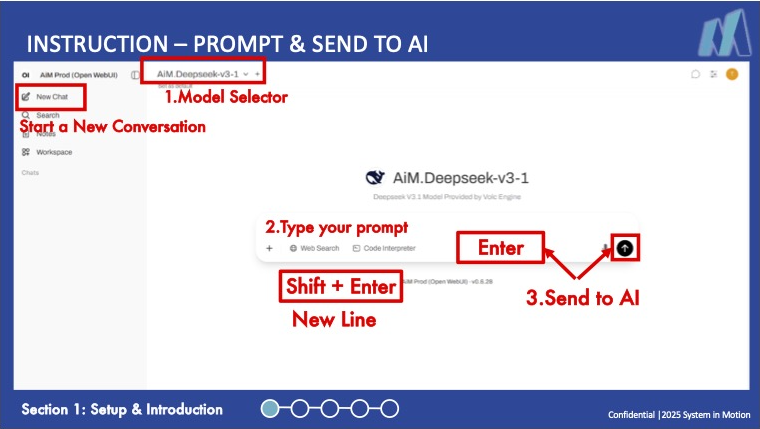
SYSYEM in Motion - AIM Platform
Features
- Secure Platform
- Model flexibility
- Prompt Library
- Knowledge Base
- Automation Integration
Category: Initiation Phase
Simple | Initiation
01: Project Charter Draft
01: Project Charter Draft
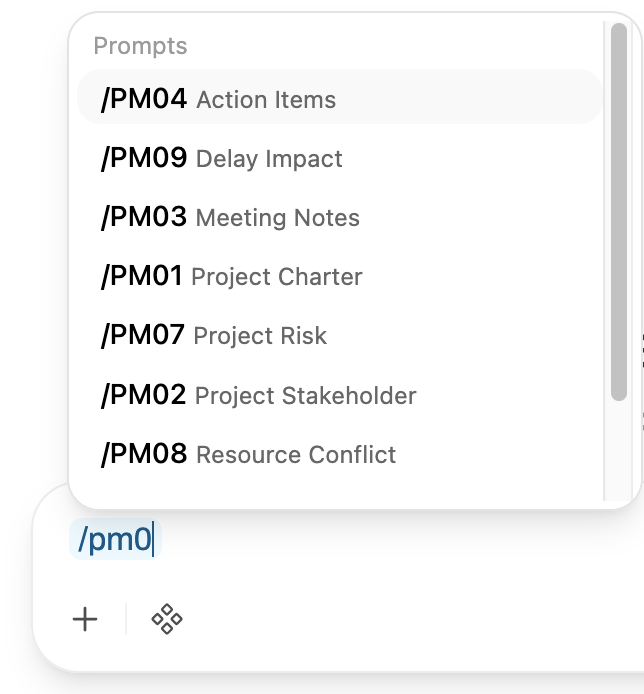
/PM01
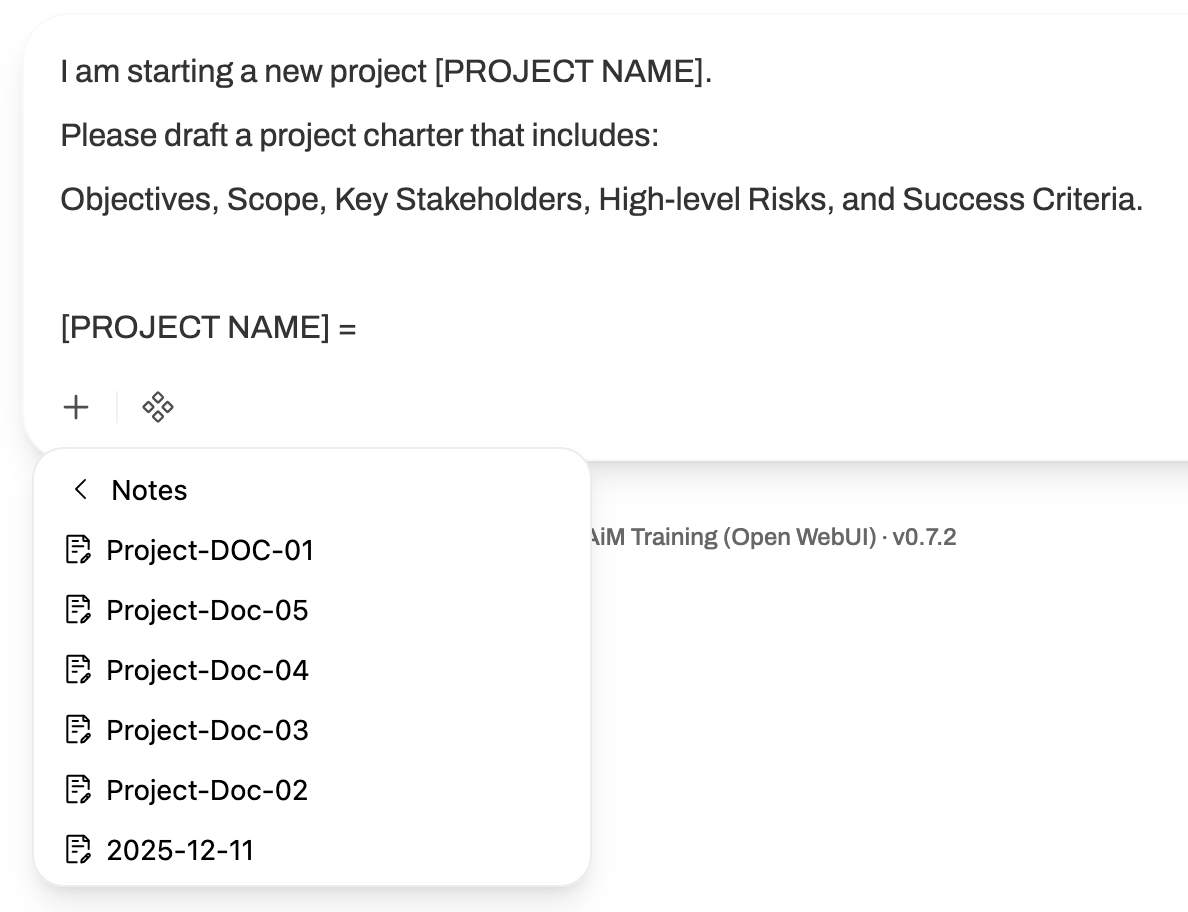
"I am starting a new project [PROJECT
NAME].
Please draft a project charter that includes:
Objectives, Scope, Key Stakeholders, High-level Risks, and Success Criteria.
[PROJECT NAME] ="
Please draft a project charter that includes:
Objectives, Scope, Key Stakeholders, High-level Risks, and Success Criteria.
[PROJECT NAME] ="
Simple | Initiation
02: Stakeholder Identification
02: Stakeholder Identification
/PM02
"Based on [PROJECT DESCRIPTION]
list all potential stakeholder groups.
Categorize them into Direct, Indirect, and External Stakeholders.
[PROJECT DESCRIPTION]=""
list all potential stakeholder groups.
Categorize them into Direct, Indirect, and External Stakeholders.
[PROJECT DESCRIPTION]=""
Sample Projects
Notes / Project-Doc-01
| Project Name | Project Description | Assigned To |
|---|---|---|
| Project A | Using a central hub/overview of current devices in terminals, the goal is to implement a routinely follow-up procedure to ensure consistent updates of device conditions and locations, sending out frequent reports requiring confirmation from relevant managers. This will allow for a reliable single version of the truth of device location and condition. | Person 1 / Person 2 |
| Project B | Creation of automated processes in a system based on files received from customers using a sandbox environment provided by HQ. This environment will be available soon. | Person 3 / Person 4 |
| Project C | Move the current shared resources from one team to a central directory, which can be linked to a chatbot for easy querying. Explore options for automated templates generated based on instructions, linking relevant information from the central directory. | Person 5 / Person 6 |
| Project D | Using advanced tools to scrape market data and analyze internal costs to ensure pricing remains competitive. Monitor latest news, projects and potential ideas, assembling these into a straightforward newsletter for regional management. | Person 7 / Person 8 |
Prompt Examples
Project Charter / Stakeholder
Use Shortcut/PM01 or /PM02
Select Notes "Project-Doc-01"
Set Project Description to Project A, B, C
or D:
Instead of Notes, you can copy/paste your
project description at the end of the
prompt.
Category: Meeting Management
Simple | Routine
03: Meeting Note Summarization
03: Meeting Note Summarization
/PM03
"I will provide transcripts/notes. Please
summarize the key discussion points into a
bulleted list. [Insert Notes]"
Simple | Routine
04: Action Item Extraction
04: Action Item Extraction
/PM04
"From these notes, extract all action items.
Include: Task, Owner, and Deadline. Format
it as a clear table."
Category: Core Planning
Intermediate | Planning
06: WBS Generation
06: WBS Generation
/PM06
"Generate a Work Breakdown Structure for
[PROJECT NAME].
Break it down into 4 levels: Project, Phases, Deliverables, and Work Packages.
[PROJECT NAME]="
Break it down into 4 levels: Project, Phases, Deliverables, and Work Packages.
[PROJECT NAME]="
Intermediate | Planning
07: Risk Matrix Creation
07: Risk Matrix Creation
/PM07
"Identify 10 potential risks for [context].
Provide Impact (1-5), Probability (1-5),
Mitigation, and Owner. Present in a Markdown
table."
Prompt Examples
WBS / RISK
Use Shortcut/PM06 or /PM07
Select Notes "Project-Doc-01"
Set Project Description to Project A, B, C
or D:
Instead of Notes, you can copy/paste your
project description at the end of the
prompt.
Category: Problem Solving
Intermediate | Plan/Exec
08: Resource Conflict
08: Resource Conflict
/PM08
"Two critical projects require the same role
during the same window. Propose 3 strategies
to resolve this conflict (splitting,
sequencing, etc.)."
Intermediate | Plan/Exec
09: Milestone Delay Impact
09: Milestone Delay Impact
/PM09
"If Milestone [X] is delayed 3 weeks,
analyze impact on [Task 1, 2, 3]. Suggest
critical path adjustments to keep go-live
date."
Category: Communication & Reporting
Simple | Comm.
05: Email Draft for Delay
05: Email Draft for Delay
/PM05
"Write a professional email to [Stakeholder]
informing them of a [X] day delay. Include
cause, new date, and mitigation steps."
Intermediate | Reporting
10: Executive Status Report
10: Executive Status Report
/PM10
"Create a 1-page Executive Status Report.
Include: RAG status, Accomplishments,
Critical Milestones, Top 3 Risks, and
Financial Summary."
Category: Analysis & Automation
Intermediate | Feedback
11: Stakeholder Sentiment
11: Stakeholder Sentiment
/PM11
"Analyze feedback collected from [group].
Categorize items into
Positive/Neutral/Concerning and identify top
3 recurring themes."
Complex | Automation
20: Automated Triage
20: Automated Triage
/PM20
"Act as triage agent for 50 tickets. Apply
logic for Critical Path, Workarounds, and UI
tweaks. Group by priority and report
density."
Prompt Examples
Stakeholder Sentiment
Use Shortcut/PM11
Select Notes "Project-Doc-02"
Instead of Notes, you can copy/paste your
own document at the end of the prompt.
Category: Retrospectives
Intermediate | Closing
12: Lessons Learned Analysis
12: Lessons Learned Analysis
/PM12
"Identify 3 best practices, 3 critical
pitfalls, and actionable recommendations for
the next cycle based on [logs]."
Intermediate | Closing
13: Post-Mortem Report
13: Post-Mortem Report
/PM13
"Draft a report including Project Summary,
Variances, Root Cause Analysis, and Future
Recommendations. Tone must be objective."
Category: Value & Transition
Intermediate | Closing
14: Project Performance ROI
14: Project Performance ROI
/PM14
"Calculate ROI and metrics for [data].
Present a summary for the CFO highlighting
value delivered and payback period."
Intermediate | Closing
15: Handoff Documentation
15: Handoff Documentation
/PM15
"Generate a Handoff document. Include:
System Overview, Access details, Watched
items, Maintenance, and Escalation Matrix."
Category: Strategic Modeling
Complex | Strategic
16: Scenario Modeling
16: Scenario Modeling
/PM16
"Help me model 3 distinct scenarios:
Optimistic, Pessimistic, and Most Likely.
Contrast Finish Date, Cost, and Risk
Rating."
Complex | Portfolio
17: Multi-project Dependency
17: Multi-project Dependency
/PM17
"I have 3 interconnected projects. If
Project X slips 4 weeks, analyze cascading
impact. Identify the most at-risk project."
Category: Advanced Techniques
Complex | Technical
18: Prompt Refinement Chain
18: Prompt Refinement Chain
/PM18
"Work step-by-step: 1. Identify bottleneck
cause. 2. Propose 3 changes. 3. Draft
implementation plan. 4. Write Definition of
Done."
Complex | Advanced
19: Custom GPT Persona
19: Custom GPT Persona
/PM19
"Act as a Senior PMO Director with 20 years
exp. Persona: analytical, data-driven,
direct. Always end with 'Three Hard
Questions'."
Prompt Examples
Custom GPT Persona
Use Shortcut/PM19
Select Notes "Project-Doc-01"
Instead of Notes, you can copy/paste your
project portfolio at the end of the prompt.
A.W.E.S.O.M Methodology
Assessment
A.I. Readiness Assessment
Strength & Weaknesses
WebApp
Deploy a GenAI front-end
Champions Activated
Education
Train All Knowledge Workers
Daily Tasks Accelerated
Strategy
Clear Objectives & KPIs
Clear Roadmap
Old + New
Integrate Old Tech with GenAI
1 Key Workflow Accelerated
0
1
2
3
4
5
➔
Zero Maturity
AI-Driven Core
Key Takeaways
Iterate your prompt and system
Own your platform and secure data
Build a community of practice
Resources
🟢 Free for Everyone
Practical Application of GenAI for PMs
Applying GenAI tools & workflows
GenAI Overview for PMs
GenAI concepts, tools & use-cases
Prompt Engineering for PMs
Interacting with LLMs effectively
PMI-CPMAI™ Introduction
AI PM & CPMAI™ methodology
🔵 PMI Members Only
Data Landscape of GenAI for PMs
Data, governance, ethics & compliance
AI in Agile Delivery
Using AI to enhance agile teams
What You Should Do Next
1: Write yourself an email, with 3 actions items,
based on this session.
https://system-in-motion.com/en/newsletter/
2: If you don't have one already, build your own prompt library
3: Ensure you have a private/secure platform4: Join a community or build one in your organization.
5: Register to our Newsletter:https://system-in-motion.com/en/newsletter/
Q&A
Your Turn
Open discussion on challenges and insights
Thank You
Access the full library and workshop notes at the
provided link.
Let's build better together.